A step-by-step walkthrough to claim your store URL, configure your WhatsApp ordering number, and publish your first products.
3 min read
Updated for 2026
Free Forever Plan
Zero Technical Experience Required
PyWorks does not require coding, complex database setups, or paid hosting fees. You can launch directly from your smartphone or laptop.
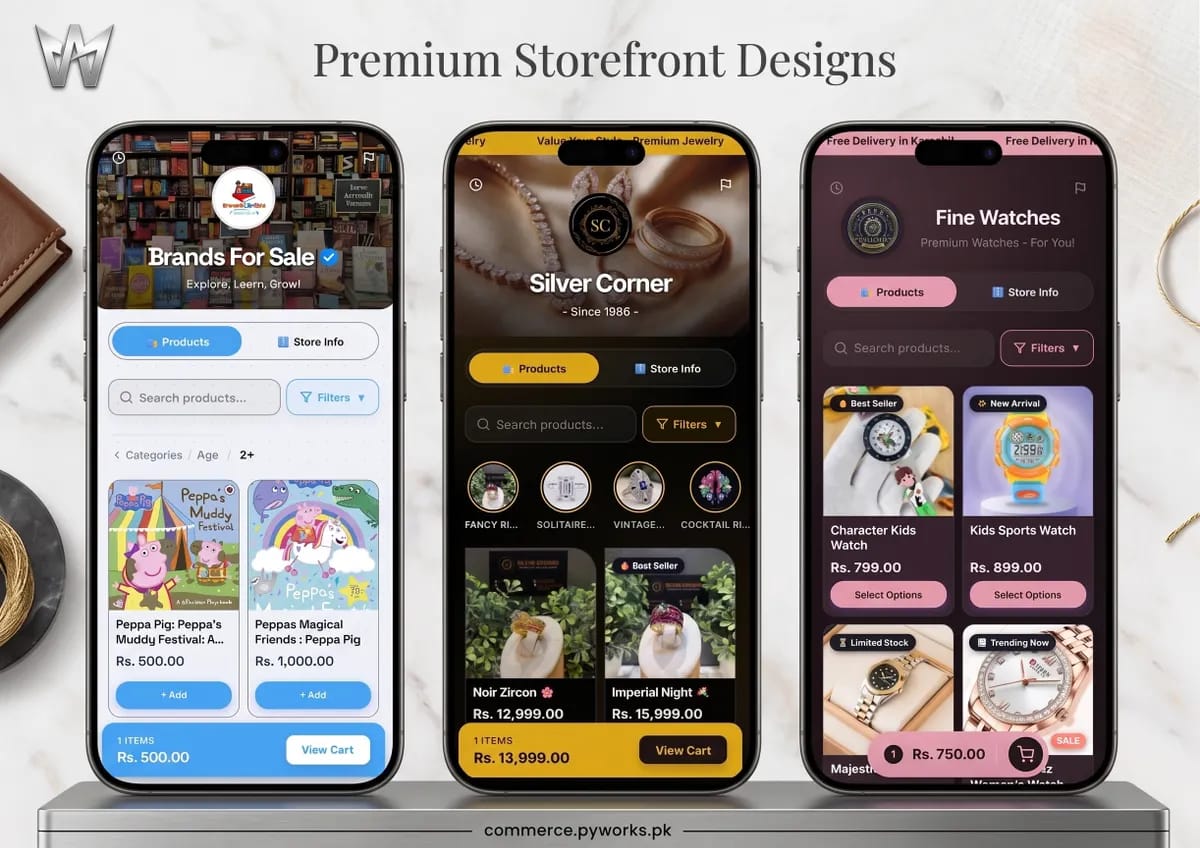
Real Merchant Storefront: Active PyWorks storefront (Brands For Sale) showing live banner, verified badge, flash sale timer, and product catalog
Step-by-Step Setup Process
1
Claim Your Free Subdomain
Visit the Signup Page, enter your official brand name, and claim your permanent storefront address: yourbrand.pyworks.pk.
2
Set Your Official WhatsApp Number
Provide your WhatsApp business number formatted with the country code (for Pakistan, start with +92). Customer orders, product codes, and delivery addresses will automatically dispatch to this chat.
3
Add Your First Product
Click Add Product in your dashboard. Upload high-resolution images, input your price in PKR, and add an optional description with size or material specifications.
4
Share Your Store Link
Paste your store link in your Instagram bio, TikTok profile, and WhatsApp catalog. Shoppers can immediately browse and submit orders with sub-second page loads.
Ready to launch your online business?
Join thousands of Pakistani merchants selling directly with PyWorks.
Open an incognito or private window and navigate to your store link (e.g. yourbrand.pyworks.pk) to preview the storefront without cached admin credentials.
2
Add Product & Fill Checkout Form
Select an item, add it to your cart, and enter sample recipient details (Name, Delivery Address, City, and Contact Phone).
3
Inspect WhatsApp Message Structure
Clicking "Place Order" will trigger your WhatsApp application with the exact purchase receipt, order ID, product codes, delivery charges, and final order total.
Visual Store Builder: Patterns & Wallpapers
Customizing your desktop side patterns, wallpaper backgrounds, and brand color palette.
5 min read
Updated for 2026
Real-Time Preview Canvas
Every color change, pattern rotation, and wallpaper adjustment renders synchronously in the visual smartphone simulator before you publish changes.
https://commerce.pyworks.pk/builder
Theme Gallery Animation: Real-time theme and wallpaper switching with responsive smartphone simulation
Styling Features
Desktop Side Patterns: Select from over 20 geometric, lattice, or organic motif patterns that gracefully frame your mobile storefront on wider desktop displays.
Wallpaper Backgrounds: Upload custom texture artwork or photographic backdrops that scale crisply across responsive viewports.
Accent & Contrast Tones: Define primary brand hex codes to automatically tint buttons, sale badges, and interactive highlights.
Learn how Fine Watches creates luxury listings with macro photography, original slash prices, and detailed specifications.
Target: 2:00 min
Partner Case: Fine Watches
Product Pricing & Catalog Fields
Field Name
Type
Customer Display Impact
Price (Selling Price)
Currency Number
The actual price charged at checkout (e.g. Rs. 3,500).
Original / Cut Price
Currency Number (Optional)
Renders strike-through text (e.g. Rs. 4,500) and automatically calculates the "Save 22%" badge.
Badge Tag
Trending Now, Best Seller, New Arrival
Renders an eye-catching pill at the top of the product card on catalog grids.
Listing Creation Workflow
1
Image Upload & Compression
Upload JPEG, PNG, or WebP images. PyWorks edge automatically converts and compresses files to maintain fast performance over mobile networks.
2
Sale Price vs. Original Price
Enter an Original Price (e.g., Rs 3,500) and a Discount Price (e.g., Rs 2,499). The storefront calculates and presents the exact percentage savings badge (e.g., -29% OFF).
Managing Product Variants (Sizes & Colors)
Configure multi-option selections allowing buyers to choose specific sizes, colors, or materials before checkout.
4 min read
Updated for 2026
1-2 Min Video Tutorial
Configuring Ring Sizes, Colors & Material Variants
Watch Silver Corner set up jewelry options (Ring sizes 6-10, Pure Silver vs Gold Polish) with distinct price rules.
Target: 1:50 min
Partner Case: Silver Corner
Variant Architecture
Attribute
Examples
Pricing Logic
Material / Metal
Pure 925 Silver, 18K Gold Plated
Can carry a positive price differential (e.g. +Rs. 500 for gold plating).
Sizing
Sizes 6, 7, 8, 9, 10
Enables customer size selection dropdown with independent stock depletion.
Option Configuration
Variant Groups: Create groups such as "Size", "Color", or "Fabric".
Options List: Provide comma-separated options (e.g. Small, Medium, Large, XL).
Checkout Dispatch: The customer's chosen variants are bundled directly into the WhatsApp order receipt.
Inventory & Out-of-Stock Management
Control item availability and prevent overselling with instant stock toggles and automatic badge updates.
3 min read
Updated for 2026
1-2 Min Video Tutorial
Stock Management, Low-Stock Alerts & Sold Out Statuses
How Fine Watches tracks limited edition timepieces to prevent overselling and trigger automated stock alerts.
Target: 1:30 min
Partner Case: Fine Watches
Inventory States
Status Flag
Dashboard Toggle
Storefront Behavior
Active (In Stock)
Green toggle
Product is purchasable; Add to Cart / WhatsApp buttons are fully active.
Sold Out
Red toggle
Greys out the Add button, displays "Sold Out" overlay badge, and disables checkout.
Archived / Hidden
Archive button
Removes product completely from customer catalog without deleting sales history.
When stock is depleted, switch the product status to Out of Stock. The checkout CTA automatically transforms into a non-clickable "Sold Out" state, preserving catalog visibility while blocking unfulfillable orders.
The WhatsApp Checkout Engine Explained
Why structured WhatsApp checkout achieves higher conversion rates in Pakistan than traditional multi-step forms.
5 min read
Updated for 2026
1-2 Min Video Tutorial
Automated WhatsApp Order Receipts & Routing
See how Brands For Sale compiles customer carts into structured, itemized WhatsApp order messages with delivery addresses.
Target: 1:35 min
Partner Case: Brands For Sale
WhatsApp Message Receipt Format
Component
Data Injected
Sample Customer Message
Order Header
Store Name & Order Ref
*NEW ORDER - BRANDS FOR SALE* (ORD-871)
Itemized Cart
Quantity × Item Name & Variants
1x Fish by Fish (Rs. 1,200) | 1x Bounce Bunny (Rs. 2,100)
Delivery Details
Name, Phone, City, Address
*Shipping To:* Zainab (Karachi)
Total & COD
Subtotal + Delivery Fee = Total
*Grand Total:* Rs. 3,300 (Cash on Delivery)
https://commerce.pyworks.pk/checkout-walkthrough
Customer Walkthrough Video: Selecting products, entering delivery details, and generating automated WhatsApp order
Conversion Advantages
Zero Password Walls: Shoppers do not need to register accounts or recall passwords, eliminating cart abandonment.
Direct Communication: Answer customer questions regarding delivery schedules or custom requests immediately in the same chat thread.
0% Platform Commission: PyWorks does not deduct percentages from your transactions. All earnings go directly to you.
Automated Live Order Tracking (/track)
Provide branded shipment tracking portals to your customers without third-party subscriptions.
Real Order Tracking Portal: Milestone stepper showing live parcel progress from Pending to Delivered with verified status timestamps
https://commerce.pyworks.pk/track
Live Order Tracking Walkthrough: Animated parcel progression across confirmation and fulfillment stages
Each confirmed order generates a unique reference code (e.g. ORD-90214). Customers can track dispatch milestones directly at commerce.pyworks.pk/track or through direct SMS/WhatsApp links.
Understand the multi-tenant edge routing engine delivering sub-millisecond page loads across Pakistan and globally.
Target: 2:00 min
Partner Case: PyWorks Commerce Infrastructure
Edge Network Benchmarks
Metric
PyWorks Cloudflare Edge
Standard Shared Hosting
Time to First Byte (TTFB)
< 35 ms
600 - 1500 ms
SSL Encryption
TLS 1.3 / HTTP/3 Automated
Manual certificate renewals
Uptime SLA
99.9% High Availability
Frequent downtime during sales
PyWorks storefronts leverage Cloudflare Workers and global points of presence across Pakistan and worldwide. Image assets and stylesheets are cached on regional edge servers, ensuring sub-second response times on mobile devices.
No Matching Guides Found
Try searching for terms such as "domain", "whatsapp", "variants", "delivery", or "theme".